What Internet Speed Do You Need for IPTV in 2026? Complete Guide
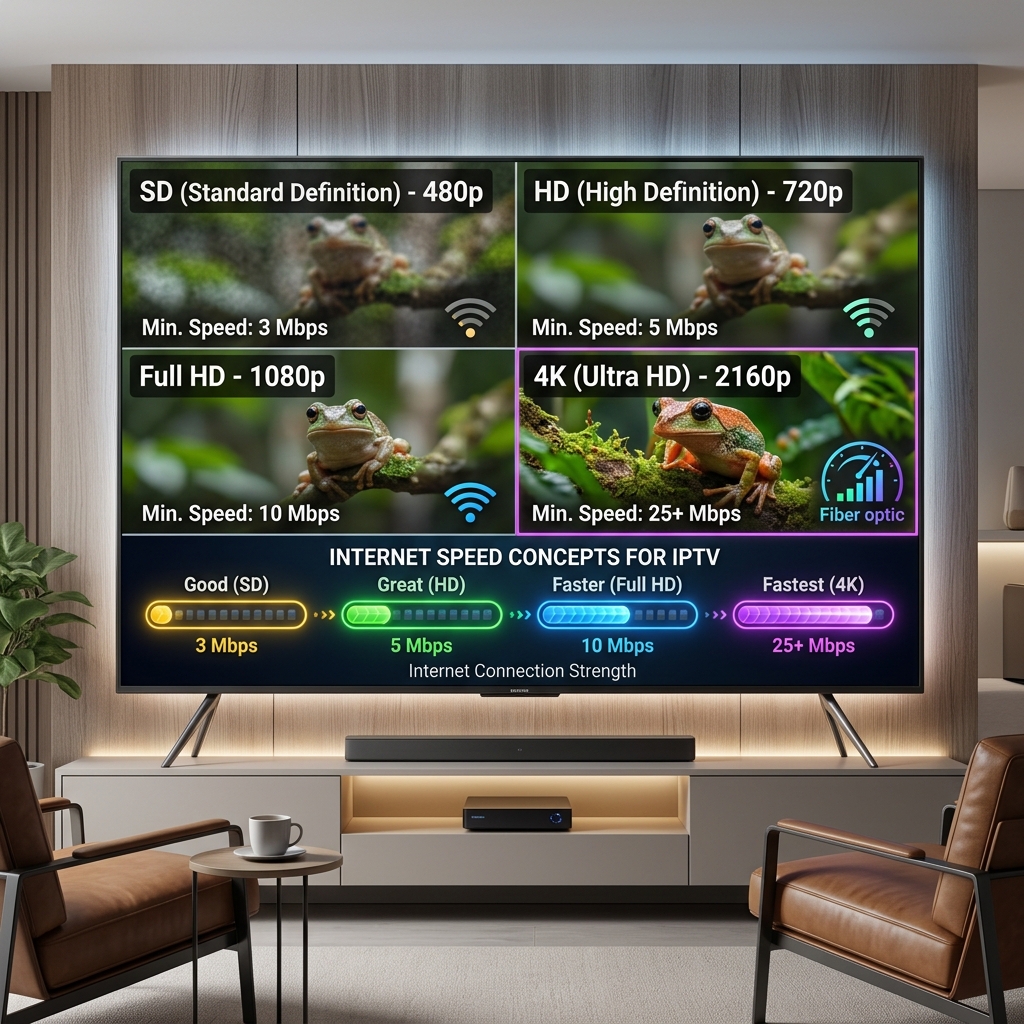
What Internet Speed Do You Need for IPTV in 2026? Complete Guide
Introduction
"What internet speed do I need for IPTV?" It is arguably the most common question asked by anyone setting up a new streaming service. As we settle into 2026, internet speeds are faster than ever, and 4K streaming has become the standard rather than the exception. However, despite having what seems like an incredibly fast internet connection, many users still experience frustrating buffering, stuttering, and dropped frames.
The simple truth is that there is no single, magical internet speed that works perfectly for every IPTV setup. The bandwidth you actually require depends heavily on the video quality you want to stream, the video codec being used by the provider, the number of simultaneous streams running in your house, your device's decoding capabilities, and most importantly, the overall stability of your network.
While a basic SD broadcast can run smoothly on a minimal connection, watching a live sports event in True 4K requires significantly more robust infrastructure. Whether you are using the premium FreeGoTV IPTV service or another provider, this comprehensive guide will break down exactly how much internet speed you need for IPTV in 2026. We will explore the differences between HD and 4K, why multiple devices change the equation, and why a fast connection on a speed test doesn't always guarantee a buffer-free experience.
Quick Answer: How Much Internet Speed Does IPTV Need?
If you are looking for a fast, practical baseline before diving into the technical details, we have compiled a quick reference table.
It is crucial to understand that these numbers represent approximate recommended ranges, not universal, absolute rules. Actual requirements can shift based on the specific bitrate of the channel being broadcast.
| Streaming Quality | Practical Minimum | Recommended Target |
|---|---|---|
| SD (480p) | 3–5 Mbps | 5–10 Mbps |
| HD (720p) | 5–10 Mbps | 10–15 Mbps |
| Full HD 1080p | 10–15 Mbps | 15–25 Mbps |
| 4K UHD (2160p) | 25 Mbps | 35–50+ Mbps |
These targets represent the bandwidth required dedicated exclusively to the IPTV stream. If someone else in your home is downloading a massive video game while you try to watch a 4K movie, you will need a much higher total household speed than the 50 Mbps listed above.
IPTV Internet Speed Requirements by Video Quality
To truly understand what internet speed you need for IPTV, you must understand how video resolution dictates data transfer.
SD IPTV (Standard Definition)
Standard Definition (usually 480p) is mostly a relic of the past, but it remains highly useful for mobile viewing or for users with severely limited internet connections. Because the resolution is low, the data footprint is tiny.
- Practical Minimum: ~3 Mbps
- Who it is for: Users watching on small smartphone screens, or those living in rural areas with very slow satellite internet.
HD IPTV (High Definition)
High Definition (720p) offers a significant step up in clarity while still remaining manageable for basic internet connections.
- Practical Minimum: ~5-10 Mbps
- Who it is for: Users watching on smaller televisions (32-inch or below) or those with older ADSL connections. It provides a crisp picture without overwhelming an average network.
Full HD IPTV (1080p)
Full HD (1080p) is currently the gold standard for standard television broadcasting. Most live sports, news, and daily programming are delivered in 1080p. It requires a noticeably higher bitrate to render the sharp details and smooth motion.
- Practical Minimum: ~10-15 Mbps
- Recommended Target: 15-25 Mbps to ensure that sudden spikes in action (like a fast-moving soccer ball) do not cause stuttering.
4K IPTV (Ultra HD)
4K (2160p) contains four times the pixels of 1080p. It offers breathtaking clarity but requires a massive amount of continuous data.
- Practical Minimum: 25 Mbps
- Recommended Target: 35-50+ Mbps
- Considerations: To stream 4K successfully, you need more than just speed; you need extreme stability. A hardwired Ethernet connection is highly recommended.
Do not believe claims that 4K "only" needs exactly 15 Mbps. While highly compressed VOD (Video on Demand) content might briefly dip that low, live 4K TV—especially live sports—requires a significantly wider data pipeline.
Why Does 4K IPTV Need More Internet Speed?
Why the massive jump in requirements from Full HD to 4K?
It all comes down to the amount of visual data being transferred every single second. A 1080p frame contains roughly 2 million pixels. A 4K frame contains over 8 million pixels. Pushing that much data over the internet 60 times a second requires immense bandwidth.
Furthermore, high-quality 4K streams often utilize advanced encoding (like HEVC/H.265) and occasionally include HDR (High Dynamic Range) metadata for better color and contrast. While HEVC compression is incredibly efficient, the raw bitrate required for a live broadcast is still huge.
If you are experiencing buffering specifically on 4K channels while HD channels work perfectly, your internet connection (or your device's Wi-Fi chip) is almost certainly struggling to handle the data load. You can learn more about this specific issue in our dedicated guide on Fixing IPTV 4K Buffering.
How Much Internet Speed Do You Need for Multiple IPTV Devices?
If you have a multi-screen household, the speed equation changes dramatically. Internet requirements are cumulative.
If your living room Smart TV is pulling a 25 Mbps Full HD stream, and your bedroom Firestick is pulling another 25 Mbps Full HD stream, you are instantly using 50 Mbps of your total bandwidth.
Here is a practical table for multi-device households:
| Simultaneous Streams | Example Quality | Suggested Connection |
|---|---|---|
| 1 | Full HD | 25 Mbps+ |
| 2 | Full HD | 50 Mbps+ |
| 3 | Full HD | 75 Mbps+ |
| 4 | Full HD | 100 Mbps+ |
| 1 | 4K UHD | 50 Mbps+ (target) |
| 2 | 4K UHD | 100 Mbps+ |
Note: These are practical targets, not strict technical minimums. They assume you want a buffer-free experience.
If you are interested in setting up multiple screens, ensure your IPTV subscription actually permits it. Learn more in our detailed guide on using IPTV on Multiple Devices.
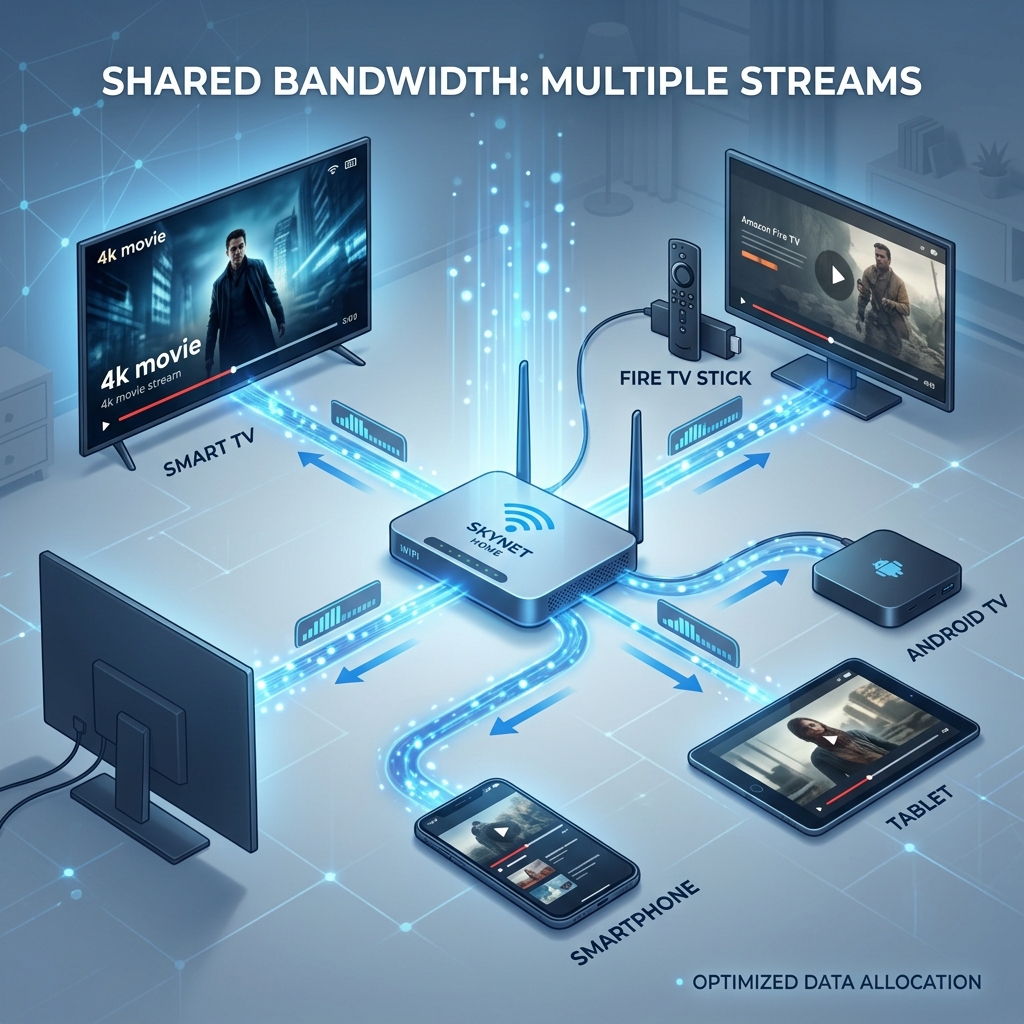 Internet bandwidth for IPTV streaming on multiple devices
Why You Should Leave Extra Bandwidth for IPTV
When determining what internet speed you need for IPTV, you must calculate for "bandwidth headroom."
The entire capacity of your internet connection is almost never available solely for your television. In a modern 2026 home, your router is constantly managing background traffic from:
- Smartphones downloading app updates
- Computers syncing cloud backups
- Smart home devices (security cameras, thermostats)
- Other family members watching Netflix or YouTube
- Online video gaming
If you have exactly a 25 Mbps internet plan, and a 4K IPTV stream requires 25 Mbps, you will experience buffering the absolute second your phone decides to fetch a new email.
We highly recommend maintaining a buffer of at least 30-40% above your strict IPTV requirements to ensure other household activities do not disrupt your stream.
Premium FreeGoTV Streaming — Save 61% Today
Unlock crystal-clear HD/4K streaming, advanced EPG, and zero buffering. Get our Ultimate 12-month plan for just $69.99.
- Premium Antifreeze
- Instant Setup
Is Internet Speed the Only Thing That Matters?
This is perhaps the most important concept in this entire guide: Raw internet speed is not the only thing that matters. In fact, for IPTV, it is often secondary to network stability.
A speed test only gives you a brief snapshot of your connection's absolute maximum capacity for a few seconds. An IPTV stream, however, is a relentless, continuous flow of data that lasts for hours.
A highly unstable 200 Mbps connection will result in a terrible IPTV experience. A perfectly stable 50 Mbps connection will provide flawless 4K playback.
When evaluating your internet for IPTV, you must consider:
- Consistent throughput: Does your speed drop dramatically every five minutes?
- Latency (Ping): How long does it take for data to travel from the server to your device? High latency causes delays.
- Jitter: Does your latency fluctuate wildly? High jitter causes stream desynchronization.
- Packet loss: Are pieces of the data stream getting lost over Wi-Fi? Lost packets force the player to pause and buffer.
- Network congestion: Are your neighbors slowing down your neighborhood's shared cable line during peak evening hours?
"More Mbps does not automatically guarantee no buffering." If your underlying connection is noisy and unstable, you will experience freezing regardless of your speed tier.
Is Ethernet Better Than Wi-Fi for IPTV?
The debate between Wi-Fi and Ethernet is ongoing, but for live IPTV streaming, the answer is clear.
Ethernet (Wired Connection)
An Ethernet cable provides a direct, physical link between your router and your streaming device.
- Advantages: It is immune to wireless interference, provides rock-solid stability, guarantees zero packet loss, and delivers consistent maximum throughput.
- Verdict: Ethernet is the absolute best choice for IPTV, especially for 4K streaming or live sports.
Wi-Fi (Wireless Connection)
Modern Wi-Fi is incredibly fast, but it relies on radio waves that can be disrupted by physical obstacles and electronic interference.
- Advantages: It is highly convenient, requires no cable routing, and works perfectly well when the signal is strong and the router is nearby.
- Verdict: Wi-Fi is perfectly acceptable for HD and Full HD streaming, provided your router is of high quality and placed correctly. However, it introduces the risk of random buffering due to invisible interference (walls, microwaves, Bluetooth devices).
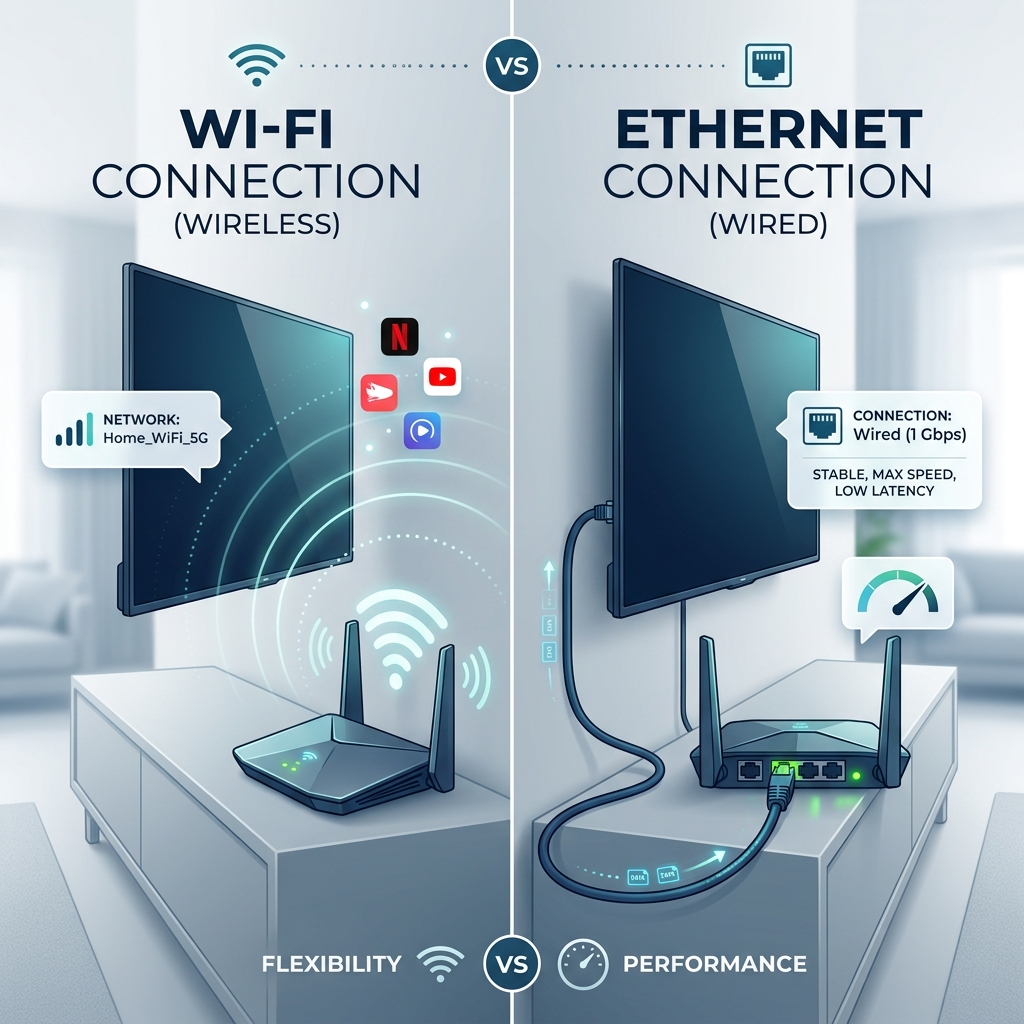 Wi-Fi vs Ethernet connection for IPTV streaming
Should You Use 2.4 GHz or 5 GHz Wi-Fi for IPTV?
If you must use Wi-Fi, you will likely have to choose between two bands broadcast by your router.
2.4 GHz Wi-Fi
- Pros: Excellent range. It easily penetrates walls and floors.
- Cons: Slower speeds and highly congested (everyone's smart home devices and older gadgets use this band).
5 GHz Wi-Fi
- Pros: Massive bandwidth capacity. It can easily handle multiple 4K streams simultaneously. Much less congested.
- Cons: Poor range. It struggles to penetrate thick walls.
The Recommendation: If your Smart TV or Firestick is in the same room (or very close) to the router, always connect to the 5 GHz band for IPTV. The increased bandwidth and lower interference will drastically reduce buffering. If the TV is on the other side of the house, you may be forced to use 2.4 GHz for the signal to reach, but you should consider a mesh network or a long Ethernet cable instead.
How to Test Your Internet Speed for IPTV
Running a speed test on your phone while standing in the kitchen tells you absolutely nothing about how your TV will perform in the living room. To get an accurate reading, follow these steps:
- Use the streaming device: Open a web browser or download a speed testing app directly on your Smart TV, Firestick, or Android Box.
- Close background apps: Ensure no other heavy tasks are running.
- Run the test: Use a reliable service like Speedtest.net or Fast.com.
- Test multiple times: Run the test three times to ensure consistency. If the results fluctuate wildly (e.g., 80 Mbps, then 15 Mbps, then 60 Mbps), your connection is unstable.
- Test during peak hours: The most important test is at 8:00 PM on a Sunday, when your neighborhood's network is most congested.
- Compare connections: If possible, test on Wi-Fi, then plug in an Ethernet cable and test again to see the difference in stability.
If the results show a consistently fast speed on the device, your internet is likely sufficient for high-quality IPTV.
Why Does IPTV Buffer Even With Fast Internet?
This is incredibly frustrating for users who pay for Gigabit (1000 Mbps) internet. They run a speed test, see massive numbers, but their IPTV still stutters.
If your internet speed is fast but IPTV still buffers, the issue lies elsewhere in the chain:
- Wi-Fi interference: Your router may be fast, but the Wi-Fi signal reaching the TV is weak or dropping packets.
- Device limitations: Older Smart TVs and cheap Android boxes have weak processors that simply cannot decode a heavy 1080p or 4K video stream fast enough, resulting in stuttering.
- IPTV player issues: A poorly coded application can cause memory leaks and buffering. Read our guide on the Best IPTV Players to ensure you are using optimal software.
- Stream bitrate: The specific channel you are watching might be experiencing a temporary uplink issue from the broadcaster.
- ISP Throttling: Some Internet Service Providers actively throttle (slow down) IPTV traffic during peak hours, regardless of your total speed limit.
- Source/server-side problems: No amount of local internet speed can fix a server that is currently overloaded or undergoing maintenance.
Before blaming the provider, be sure to run through our complete IPTV Troubleshooting Checklist.
Premium FreeGoTV Streaming — Save 61% Today
Unlock crystal-clear HD/4K streaming, advanced EPG, and zero buffering. Get our Ultimate 12-month plan for just $69.99.
- Premium Antifreeze
- Instant Setup
How to Improve IPTV Streaming Quality
If you are experiencing speed-related issues, here are practical, immediate steps you can take to improve your IPTV streaming quality without upgrading your internet plan:
- Use Ethernet: Hardwire your primary streaming device. This solves 80% of buffering issues instantly.
- Move the router closer: If using Wi-Fi, ensure the router is out in the open, not hidden behind a TV or inside a metal cabinet.
- Switch to 5 GHz: Force your streaming device onto the faster 5 GHz Wi-Fi band.
- Pause large downloads: Stop video game updates or cloud syncing while watching live TV.
- Restart the router: A simple reboot can clear network congestion and establish a fresh connection.
- Keep the IPTV player updated: Ensure you are running the latest version of your chosen application.
- Reduce stream quality: If your internet simply cannot handle it, switch from the 4K or 1080p version of the channel to a 720p or SD version.
How Much Speed Does IPTV Need on Different Devices?
The required bandwidth depends far more on the stream quality (resolution and bitrate) than the device itself. A 1080p stream requires the same amount of data whether it is playing on a $2000 Smart TV or a $50 Firestick.
However, different devices have different hardware capabilities:
- Smart TVs: Native network cards on older Smart TVs are notoriously weak. Even with fast internet, the TV may struggle to process the data quickly enough.
- Firestick 4K / High-end Android TV Boxes: These devices feature powerful dedicated video decoders and modern Wi-Fi 6 chips, allowing them to utilize your internet speed much more efficiently.
- Smartphones / Tablets: Because the screens are small, you can often stream highly compressed SD or 720p video flawlessly, meaning mobile viewing requires significantly less bandwidth in practical terms.
If you are setting up FreeGoTV on a Smart TV, we always recommend using a dedicated external streaming device if the native TV apps perform poorly.
How Much Internet Speed Do You Need for Live Sports IPTV?
Live sports are the ultimate stress test for any IPTV service and any internet connection.
Why? Because sports broadcasts feature constant, high-speed motion (a camera panning across a soccer field, for example). This high motion prevents the video codec from compressing the image effectively, which means the raw bitrate required to keep the picture clear skyrockets.
Furthermore, sports are completely live, meaning your player cannot build a large buffer in advance like Netflix does with a movie.
If you are watching live sports in Full HD or 4K, stability is paramount. A momentary dip in Wi-Fi speed will immediately result in a freeze. If you care deeply about live sports, an Ethernet connection and a stable 50+ Mbps plan are highly recommended.
Which Internet Connection Is Best for IPTV?
When choosing an internet service provider for your home, the underlying technology matters.
Fiber Optic
The absolute best choice for IPTV. Fiber provides incredibly high speeds, ultra-low latency, and symmetric upload/download rates. It is highly stable and rarely suffers from neighborhood congestion.
Cable Internet
Very fast and highly capable, but it is a shared medium. During peak evening hours (when everyone is streaming), neighborhood congestion can cause speeds to drop and latency to spike, potentially causing temporary IPTV buffering.
DSL
Older technology utilizing phone lines. While adequate for basic HD streaming, DSL speeds (often capped at 10-20 Mbps) will struggle heavily with 4K or multiple simultaneous streams.
4G/5G Mobile Internet
While 5G can be incredibly fast, mobile internet is highly susceptible to weather, tower congestion, and latency spikes. It works for IPTV, but it is not as reliable as a fixed-line connection.
What Internet Plan Should You Choose for IPTV?
To summarize, here are practical recommendations for choosing an internet plan based on your household's needs:
- One TV + normal household use: A 50 Mbps plan is perfectly adequate. It allows for one 1080p or 4K stream while leaving headroom for phones and web browsing.
- Two TVs (Simultaneous HD): A 100 Mbps plan provides comfortable headroom to ensure neither TV buffers when someone else uses the internet.
- Multiple TVs / 4K household: A 200 Mbps to 500 Mbps plan is recommended. This ensures that massive 4K streams do not cripple the rest of the household's network.
- IPTV + heavy gaming + large downloads: If you have heavy data users in the house, Gigabit (1000 Mbps) fiber is the ultimate luxury, ensuring your IPTV stream is never starved for bandwidth.
Using FreeGoTV IPTV With Your Internet Connection
The quality of your streaming experience is a delicate combination of your chosen IPTV service, your internet connection, your device's hardware, and your IPTV player application.
At FreeGoTV, our premium servers are optimized to deliver high-quality, stable streams across a vast array of resolutions, from standard definition to breathtaking 4K. By ensuring your home network meets the practical bandwidth targets outlined in this guide—and by hardwiring your device whenever possible—you can unlock the full potential of your FreeGoTV subscription.
If you have verified your internet speed and are still facing issues, our dedicated Customer Support team is always available to help diagnose potential setup problems. You can also explore our FAQ for instant answers regarding device compatibility and optimal streaming settings.
Frequently Asked Questions
Final Thoughts
Determining exactly what internet speed you need for IPTV in 2026 doesn't have to be confusing. Remember that IPTV does not necessarily require an outrageously expensive, Gigabit-speed internet plan for every household.
While an HD stream requires much less bandwidth than a 4K stream, the most critical factor is always the stability of that bandwidth. Multiple devices will multiply your internet requirements, and maintaining a healthy "headroom" ensures that a simple phone notification doesn't interrupt your movie. Above all, utilizing an Ethernet cable rather than Wi-Fi is the single best upgrade you can make to your streaming setup.
By understanding your network and pairing a solid connection with a premium service like FreeGoTV, you can say goodbye to the buffering wheel and enjoy flawless, high-definition entertainment exactly the way it was meant to be seen.